How to Take Creative Product Photos is an essential guide for anyone looking to elevate their product photography skills. In today’s visually driven market, captivating images can significantly enhance product appeal and drive consumer engagement. This article will explore the fundamental aspects of product photography, including lighting, composition, and post-processing techniques, ensuring that your photos not only showcase your products effectively but also tell a compelling story.
From understanding the importance of lighting to creating a well-organized workspace, each section will provide you with the necessary tools and insights to produce professional-quality images. We’ll also delve into creative ideas and marketing strategies that will help you stand out in a crowded digital landscape.
Understanding the Basics of Product Photography
Product photography is a crucial aspect of marketing and sales, as it visually conveys the essence and quality of a product to potential customers. A well-executed product photograph can significantly influence purchasing decisions, making it imperative for businesses to understand and apply the fundamentals of product photography effectively.Lighting plays a pivotal role in product photography, as it can dramatically affect how a product is perceived.
Proper lighting highlights features, creates mood, and enhances textures, ensuring that the product appears appealing. For product photography, natural light and artificial lighting sources like softboxes or LED lights are commonly utilized. The choice of lighting can change the perspective of the product, with softer lighting often yielding a more flattering look, while harsher lighting can emphasize details.
Types of Cameras and Lenses Suitable for Product Photography
Selecting the right camera and lens is essential for capturing high-quality product images. Various cameras and lenses can accommodate different needs and preferences in product photography. Some popular options include:
- DSLR Cameras: Known for their versatility and image quality, DSLR cameras are favored by many photographers. They allow for interchangeable lenses, enabling users to select the most suitable lens for their specific product shots.
- Mirrorless Cameras: Offering similar benefits to DSLRs with a more compact design, mirrorless cameras provide excellent image quality and fast autofocus, making them ideal for capturing products in detail.
- Macro Lenses: These lenses allow photographers to take close-up shots, capturing intricate details of products, which is particularly beneficial for items such as jewelry or small electronics.
- Standard Zoom Lenses: A versatile option, standard zoom lenses can cover a range of focal lengths, making them suitable for various product types without the need to change lenses frequently.
The Role of Backgrounds in Enhancing Product Images
The background of a product photograph is a significant component that can either complement or detract from the product itself. A well-chosen background enhances focus on the product, while a poor choice can lead to distractions that confuse the viewer.Consider the following when selecting backgrounds:
- Solid Colors: Using a solid color background can create a clean, professional look, ensuring that the product remains the focal point. White or neutral tones are commonly used for this purpose.
- Textures and Patterns: Subtle textures or patterns can add interest without overpowering the product. Materials such as wood or fabric may evoke a specific mood or theme that aligns with the product’s branding.
- Environmental Backgrounds: Capturing products in their natural environment can provide context and tell a story. For instance, photographing gardening tools in a garden setting can convey a sense of purpose and usability.
“The right background not only enhances the visual appeal of a product image but also reinforces the brand’s narrative and identity.”
Setting Up Your Workspace

Creating a conducive workspace for product photography is essential to achieving high-quality images. A well-organized studio can enhance creativity and streamline your workflow, ensuring that you focus on capturing the best possible shots. This section will guide you through the necessary steps to set up your home product photography studio effectively.
Organizing Your Photography Studio
A well-structured photography studio requires careful planning and organization. Begin by selecting a dedicated space that is free from distractions and environmental interferences. Ensure that the area has ample natural light or good artificial lighting options to illuminate your products effectively. Consider the following tips for organizing your workspace:
- Choose a spacious area that allows you to move around freely and set up various angles.
- Keep all your equipment within reach; this includes cameras, lenses, tripods, and lighting equipment.
- Utilize storage solutions like shelves and bins to keep props and accessories organized and easily accessible.
- Establish a clean and clutter-free environment to maintain focus during your shooting sessions.
Choosing the Right Backdrop
The backdrop is a crucial element in product photography, as it can significantly impact the overall aesthetic of your images. Selecting the appropriate backdrop helps to enhance the product and eliminate distractions. When considering backdrops, keep the following in mind:
- Solid colors are often preferred for their ability to highlight the subject without competition.
- Textures such as wood, fabric, or paper can add depth and interest to the image.
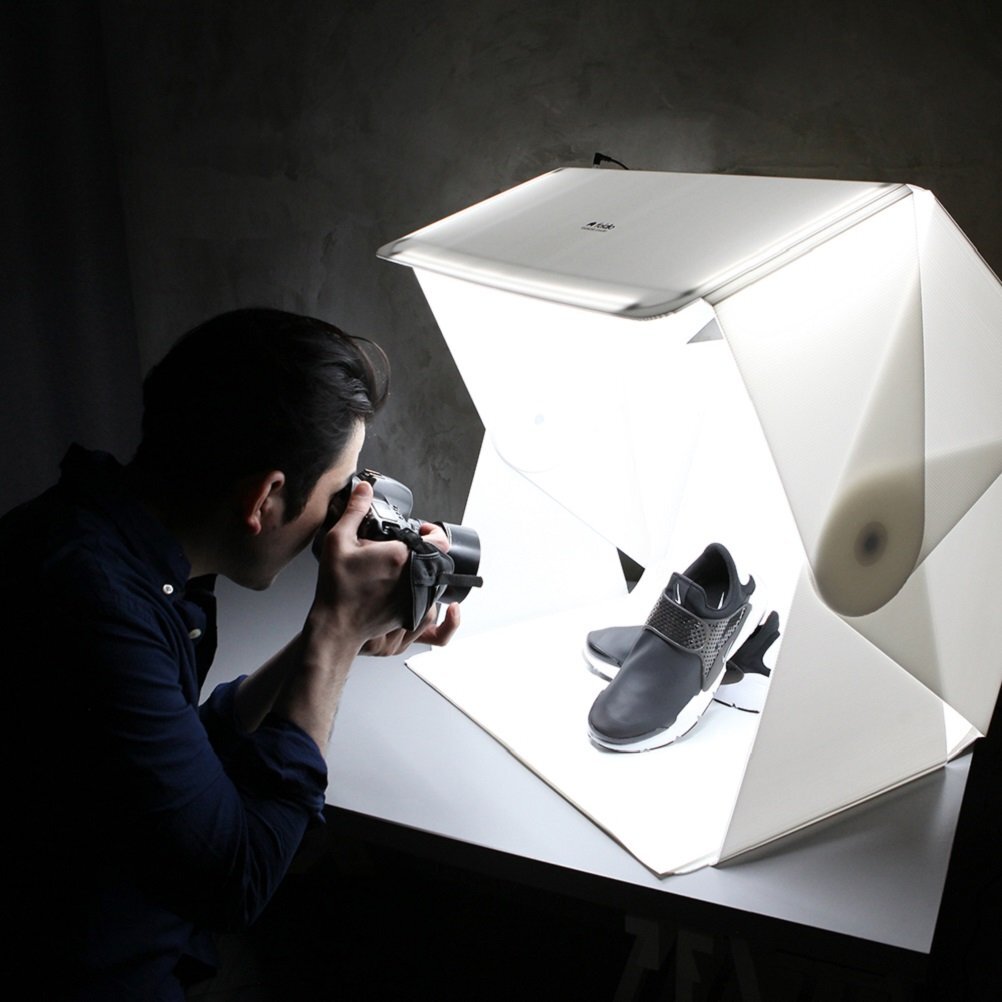
- Consider using a lightbox for small products, which provides a seamless background and diffused lighting.
- For outdoor settings, natural elements like grass or stone can create beautiful, contextual photographs.
Essential Equipment for Product Photography
Investing in the right equipment can significantly elevate the quality of your product photography. Here is a list of essential tools to consider for setting up your studio:
- Camera: A DSLR or mirrorless camera with manual settings is ideal for versatility and control.
- Tripod: A sturdy tripod is necessary to stabilize your camera and prevent blurriness, especially in low light.
- Lighting Equipment: Softboxes or LED lights are essential for creating soft, diffused lighting that minimizes harsh shadows.
- Reflectors: These tools help bounce light and fill in shadows, providing a more balanced exposure.
- Editing Software: Programs like Adobe Lightroom or Photoshop are indispensable for post-processing and enhancing images.
Lighting Techniques
Utilizing the right lighting is crucial in product photography, as it can dramatically influence the mood and quality of the images. Two primary types of lighting techniques are natural and artificial lighting, each offering unique advantages and challenges. Understanding these methods will enable photographers to create stunning product images that effectively showcase the features and details of their items.
Natural Lighting vs. Artificial Lighting
Natural lighting is derived from the sun and provides a soft, diffused quality that can enhance the visual appeal of products. On the other hand, artificial lighting, which includes various types of bulbs and fixtures, offers greater control over brightness, color temperature, and directionality. The choice between these two types of lighting largely depends on the desired outcome and the environment in which the photography takes place.
- Natural Lighting: Best utilized during the golden hours—shortly after sunrise and before sunset—natural light can create a warm glow. However, it is important to be mindful of changing weather conditions and shadows.
- Artificial Lighting: Includes fluorescent, LED, and tungsten lights. These light sources allow for consistent lighting even in varying environmental conditions, making them ideal for studio settings.
Using Reflectors and Diffusers Effectively
Reflectors and diffusers are essential tools in product photography that help manipulate light, enhancing image quality. Reflectors bounce light back onto the product, reducing harsh shadows and creating more even illumination. Diffusers soften the light source, minimizing the contrast between highlights and shadows.
- Reflectors: Available in various materials such as white, silver, or gold, each providing different effects. White reflectors yield a soft bounce, silver reflects more light, and gold adds a warm tone, making them suitable for different products.
- Diffusers: Can be made from materials like soft fabric or specialized photography panels. They help to create a more uniform light, which is effective in reducing glare on shiny surfaces.
Comparison of Different Light Sources
Different light sources have varying characteristics that impact product photography. Understanding these differences enables photographers to select the most suitable lighting for their specific needs.
| Light Source | Color Temperature (Kelvin) | Best Use |
|---|---|---|
| Fluorescent | 4000-5000K | Ideal for bright, even lighting; effective in reducing shadows. |
| LED | 2700-6500K | Versatile with adjustable brightness; energy-efficient and long-lasting. |
| Tungsten | 3200K | Produces warm tones; excellent for creating a cozy atmosphere. |
“The right lighting can elevate product photography from ordinary to extraordinary, highlighting details that attract customers.”
Composition and Framing
In product photography, composition and framing are essential components that significantly influence the viewer’s perception of a product. A well-composed photograph not only draws attention but also communicates the brand’s message effectively. Understanding the nuances of composition can elevate the quality of your product images, making them more appealing and marketable.The rule of thirds is a foundational principle in photography that can enhance the composition of your product shots.
This technique involves dividing the frame into a 3×3 grid, creating nine equal sections. The key elements of the product should be positioned along the lines or at their intersections, which naturally guides the viewer’s eye and creates a more engaging image. By adhering to this rule, photographers can avoid placing the subject directly in the center, which often results in less dynamic compositions.
Checklist for Arranging Products Within the Frame
When arranging products for photography, having a systematic approach can streamline the process and improve outcomes. The following checklist Artikels important considerations for effective product arrangement within the frame:
- Ensure the product is clean and free of dust or fingerprints to maintain visual clarity.
- Choose an appropriate background that enhances the product without distracting from it.
- Position the product according to the rule of thirds to create a balanced composition.
- Include props or complementary items sparingly to add context and interest.
- Check for symmetry and alignment to ensure a polished presentation.
- Consider the product’s scale by including an object of known size for reference if necessary.
The arrangement checklist serves as a guide to ensure that each component of the photograph contributes positively to the overall composition.
Impact of Angles on Product Presentation
The angle from which a product is photographed can dramatically alter its appearance and appeal. Different angles can highlight various features, evoke emotions, and affect the perception of size and usability. For instance, a low-angle shot can make a product appear larger and more imposing, which is particularly effective for items like electronics or cars. Conversely, a high-angle shot may provide a comprehensive view of the product and can be beneficial for showcasing details or textures that might not be visible from eye level.Experimenting with angles is crucial; it allows photographers to discover the most flattering perspectives for each product.
A straight-on view is often effective for displaying flat items like clothing or packaging, while a slight tilt can add dynamism to the shot. Additionally, capturing products from multiple angles can provide potential buyers with a more comprehensive understanding of the item, enhancing their shopping experience.
“The right angle can transform the mundane into the extraordinary.”
A guiding principle in product photography.
By thoughtfully considering composition, framing, and angles, photographers can significantly enhance the quality of their product images, ultimately contributing to improved marketing and sales outcomes.
Post-Processing Techniques
Post-processing is an essential part of product photography that can significantly enhance the quality and appeal of your images. This stage allows photographers to correct imperfections, adjust colors, and fine-tune details to create stunning visuals that effectively showcase products. Understanding various software options and basic editing techniques can empower you to elevate your photography skills to a professional level.Several software options are available for editing product photos, each offering unique features suitable for different skill levels and needs.
The choice of software can greatly impact the efficiency and quality of your editing process. Below are some popular choices in product photography editing software:
- Adobe Photoshop: Renowned for its advanced editing capabilities, Photoshop is the industry standard for image manipulation and retouching. It allows for detailed adjustments and layering techniques.
- Adobe Lightroom: This software focuses on photo management and enhancement through powerful color correction and batch editing features, making it ideal for photographers with large volumes of images.
- Capture One: Known for its superior color grading and tethering capabilities, Capture One is favored by professional photographers seeking high-quality results.
- GIMP: A free open-source alternative to Photoshop, GIMP offers many similar features, making it a great option for those on a budget.
- Canva: While primarily a graphic design tool, Canva provides simple editing features that are user-friendly for beginners looking to enhance product images quickly.
To enhance product images effectively, several basic editing techniques can be applied. These techniques help in improving clarity, consistency, and overall presentation. Below are key editing techniques to consider:
- Cropping: Adjusting the crop can help focus the viewer’s attention on the product and eliminate any distracting background elements.
- Exposure Adjustment: Correcting exposure helps ensure that the image is neither too dark nor too bright, which is crucial for accurately showcasing the product’s details.
- Contrast Enhancement: Increasing the contrast can make the product stand out more against the background, enhancing its appeal.
- Saturation and Vibrancy Adjustments: Fine-tuning saturation and vibrancy can enrich colors, making products look more vibrant without losing their true hues.
- Sharpening: Adding sharpness to images enhances details, ensuring that products appear crisp and clear.
Color correction is a vital component of post-processing in product photography. Accurate colors are necessary for maintaining the authenticity of the product and ensuring customer satisfaction. The following step-by-step guide Artikels a basic approach to color correction:
Color Correction Steps
Begin by assessing the image for color imbalances. Assess the overall tone and target specific hues that may need adjustment.
- Open the image in your chosen editing software. Utilize software that supports color correction tools, such as Photoshop or Lightroom.
- Adjust White Balance: Use the white balance tool to neutralize any color casts. This can often be done by selecting a neutral gray area in the image.
- Utilize Color Curves: Access curves to adjust the individual RGB channels. This allows for precise control over the color balance, enhancing specific hues without affecting the entire image.
- Adjust HSL Settings: Modify Hue, Saturation, and Lightness (HSL) settings to correct colors as needed. For example, increase the saturation slightly to make the product more vivid.
- Check for Color Consistency: Compare the edited image against the product to ensure accurate color reproduction. This step is crucial in maintaining brand integrity.
- Save and Export: Once satisfied with the edits, save the image in the desired format, ensuring to retain a high-resolution version for print or web use.
By mastering these post-processing techniques, photographers can significantly improve their product images, resulting in more engaging and professional-grade photographs that attract and retain customers’ attention.
Creative Ideas for Unique Product Shots

Innovative product photography can significantly enhance the visual appeal of your offerings, capturing the attention of potential customers. By thinking outside the box, you can elevate your product imagery to not only showcase the item but also tell a compelling story that resonates with your audience.In this section, we will explore various creative strategies to display products effectively, including the use of props, motion, and thematic concepts for seasonal photography.
These approaches can transform standard product images into dynamic visuals that engage and inspire.
Innovative Ways to Showcase Products through Props and Styling
The use of props and styling in product photography is essential for creating a captivating scene that complements the subject. Props can add context, enhance storytelling, and create a specific mood. A well-thought-out arrangement of props can showcase the versatility and utility of a product.Consider the following ideas when incorporating props and styling into your photography:
- Utilize natural elements such as plants, stones, or wood to create an organic feel, particularly for eco-friendly products.
- Incorporate lifestyle elements like books, coffee mugs, or furniture to create a relatable setting that appeals to your target audience.
- Experiment with textures such as fabrics, metals, and glass to add depth and interest to the composition.
- Use color theory by pairing products with complementary or contrasting props to draw attention and enhance visual appeal.
- Incorporate thematic accessories that align with the product’s purpose, such as kitchen utensils for cooking gadgets or exercise mats for fitness equipment.
Use of Motion and Action in Product Photography
Including motion in product photography can create a sense of dynamism and excitement. Capturing products in action or using techniques that suggest movement can effectively convey the benefits and usability of your offerings.Consider these techniques for incorporating motion and action into your shots:
- Freeze action shots, such as pouring liquid or dust particles, to demonstrate a product’s functionality in an engaging way.
- Use long exposure photography to create a blur effect that suggests movement, emphasizing the speed or efficiency of a product.
- Incorporate models interacting with the product to give a relatable perspective on its use, enhancing the viewer’s connection with the item.
- Experiment with creative angles, such as overhead shots or low perspectives, to capture the product in a dynamic context that showcases its features.
- Utilize props that convey movement, such as flowing fabrics or dynamic lighting, to create visual interest in static shots.
Thematic Concepts for Seasonal Product Photography
Seasonal themes can add relevance and timeliness to your product photography, allowing you to connect with customers on a personal level. Adjusting your imagery to reflect the seasons can enhance emotional engagement and drive sales.Here are some thematic concepts to consider for seasonal product photography:
- Spring: Focus on renewal and growth with vibrant colors, flowers, and outdoor settings to evoke feelings of freshness and optimism.
- Summer: Emphasize fun and adventure with beach or picnic settings, bright colors, and props that suggest leisure activities.
- Autumn: Showcase warm hues, rustic props, and cozy settings to create a sense of comfort and nostalgia associated with the fall season.
- Winter: Highlight themes of warmth and celebration with soft fabrics, holiday decorations, and cozy indoor scenes that resonate with winter festivities.
- Holidays: Customize product shots with thematic decorations pertinent to various holidays, such as Christmas, Halloween, or Valentine’s Day, to capture the spirit and excitement of the season.
Tips for Marketing and Sharing Product Photos
Effective marketing and sharing of product photos are vital components in attracting customers and enhancing brand visibility. Leveraging high-quality images is essential for engaging potential buyers and driving sales across various platforms. This segment will cover best practices for optimizing product photos for social media, creating visually appealing online catalogs, and engaging customers through product images on e-commerce platforms.
Optimizing Product Photos for Social Media
In the realm of social media, the presentation of product photos can significantly impact audience engagement and brand perception. It is crucial to ensure that images are tailored to each platform’s specifications while maintaining high clarity and aesthetic appeal. Important practices include:
- Resolution and Dimensions: Use high-resolution images that meet the specific size requirements of each platform, such as 1080×1080 pixels for Instagram posts.
- Consistent Branding: Incorporate brand colors, logos, and styles to create a cohesive look across all posts, reinforcing brand identity.
- Engaging Captions: Craft captions that not only describe the product but also encourage interactions, such as asking questions or inviting followers to share their thoughts.
- Utilizing Hashtags: Use relevant hashtags to expand reach and attract users who are interested in similar products, aiding discoverability on platforms like Twitter and Instagram.
Creating Visually Appealing Online Catalogs
An online catalog should not only serve as a showcase of products but also engage customers through visually appealing layouts and imagery. The following strategies can enhance the effectiveness of online catalogs:
- Grid Layouts: Use a clean grid layout to organize products visually, making it easier for customers to browse through items methodically.
- High-Quality Images: Ensure that all product images are professionally taken, highlighting details and textures that appeal to potential customers.
- Interactive Elements: Incorporating elements such as zoom features or 360-degree views can provide a more immersive experience, allowing customers to examine products closely.
- Seasonal Themes: Update the catalog to reflect seasonal changes or special promotions, aligning product presentation with current trends and customer interests.
Engaging Customers on E-commerce Platforms
On e-commerce platforms, the use of compelling product images can significantly influence purchasing decisions. To foster customer engagement, consider the following methods:
- Multiple Angles: Showcase products from various angles to give customers a comprehensive view, helping them make informed decisions.
- Contextual Images: Display products in use or in lifestyle settings, demonstrating their application and enhancing relatability for customers.
- Customer Reviews with Photos: Encourage customers to submit their own photos alongside reviews, creating a community-driven approach that builds trust and authenticity.
- Special Offers and Promotions: Highlight discounts or limited-time offers with visually striking images, drawing attention and prompting immediate action.
Final Thoughts
In conclusion, mastering the art of product photography opens up numerous opportunities for enhancing your brand’s visibility and appeal. By implementing the techniques and tips discussed, you can create stunning images that not only attract potential customers but also convey the essence of your products. Remember, creativity and technical knowledge combined can transform ordinary photos into extraordinary visual stories that resonate with your audience.